Foray 382 · Essai 02 · Seven models from February 2020
What has to be ready before the waste can go?
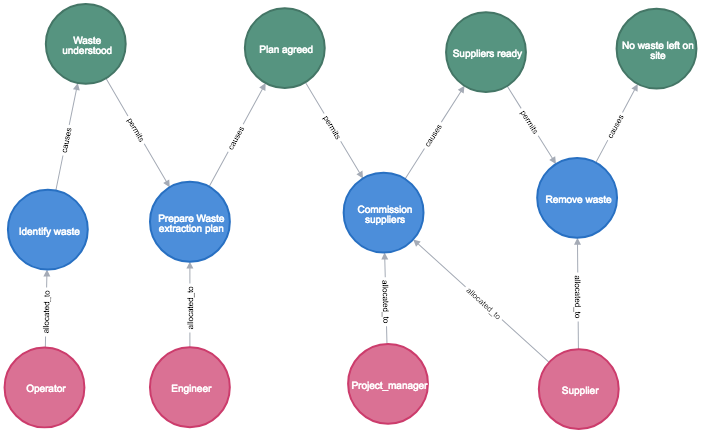
The supervisor wants to call in the supplier. The schedule shows a task called “Commission suppliers”. Does it record the supplier being ready, or even say who will remove the waste? We reopened Lawrence’s seven representations of this one job and looked for the immediate inputs to Remove waste in each.
What each saved graph can tell the supervisor
All seven were loaded together under distinct case names. Select a view to see what the replay returned. The counts cover each whole graph.
1. Tasks only · 4 nodes, 3 relationships
Commission suppliers is the preceding task. The graph says nothing about a readiness check or an allocated role.
2. States only · 4 nodes, 3 relationships
Suppliers ready leads to No waste left on site by a transitions_with_task relationship. Its source has no property naming the intervening task. Looking up a task node named Remove waste returns no rows.
3. Tasks and states · 8 nodes, 7 relationships
The input to Remove waste is now Suppliers ready. Commissioning causes the readiness state, which permits removal. A progress report could ask whether that state has actually been achieved.
4. Add resources · 12 nodes, 12 relationships
The removal task has two incoming records: Suppliers ready (condition) and Supplier (allocated role). There is no availability calendar here.
5. Add direct task links · 12 nodes, 15 relationships
Three inputs are visible: Commission suppliers, Suppliers ready and Supplier. That lets the reviewer distinguish work done, the condition to establish and who is assigned. Counting all three as predecessor tasks would overstate the work.
6. Petri-net fragment · 6 nodes, 5 arcs
Only Identify waste and Prepare Waste extraction plan occur as transitions. This saved fragment cannot answer the removal question. Its token values describe a supplied marking. The replay does not fire the transitions.
7. Stored schedule · 14 nodes, 17 relationships
The same three inputs reappear. Remove waste carries earliest start 40 and earliest finish 50 in the source’s time units. Reopening recovered those saved values. Computing new dates after a delay requires a scheduling rule.
Ask the live graph
Paste this read-only query into Aura Query after loading the workshop. The extra-links case should return three rows: Supplier / allocated_to, Commission suppliers / permits, and Suppliers ready / permits. Notice that the two uses of permits have different source labels.
MATCH (before:F382Historical {replayCase:'extra-links'})-[r]->
      (t:F382Historical:Task {replayCase:'extra-links', name:'Remove waste'})
RETURN coalesce(before.name, before.role) AS item,
       [label IN labels(before) WHERE label <> 'F382Historical'][0] AS kind,
       type(r) AS relationship
ORDER BY relationship, item;
Reopen the seven
The workshop entrance explains reopening the cloud instance. For this family alone, install the official Python neo4j driver, set the Aura connection variables described there and run python3 replay.py waste. With a populated graph, python3 replay.py waste --check-only reads the database directly. The seven checks cover 60 nodes and 62 directed relationships. They passed after a second import in the same Neo4j 5.26 database.
The loader reads the seven checksum-pinned source files as data. It retains their properties, directions and labels, scopes each source ID to its own case, and leaves the original global constraint and cleanup statements aside. Download the replay · Original Cypher from the Library · Lawrence’s illustrated comparison and Petri-net qualifications.